Our own product · Windows software

VMate AI

A whole production crew in one click. An artificial intelligence assistant that installs on your PC and works inside vMix while you are on air: it listens to the show and suggests lower thirds, obeys your voice commands, handles your video-call guests on its own and dubs your content into another language.

A small channel cannot afford a graphics operator, a translator, someone to look after the guests and an editor. VMate does that work with AI from a single computer.

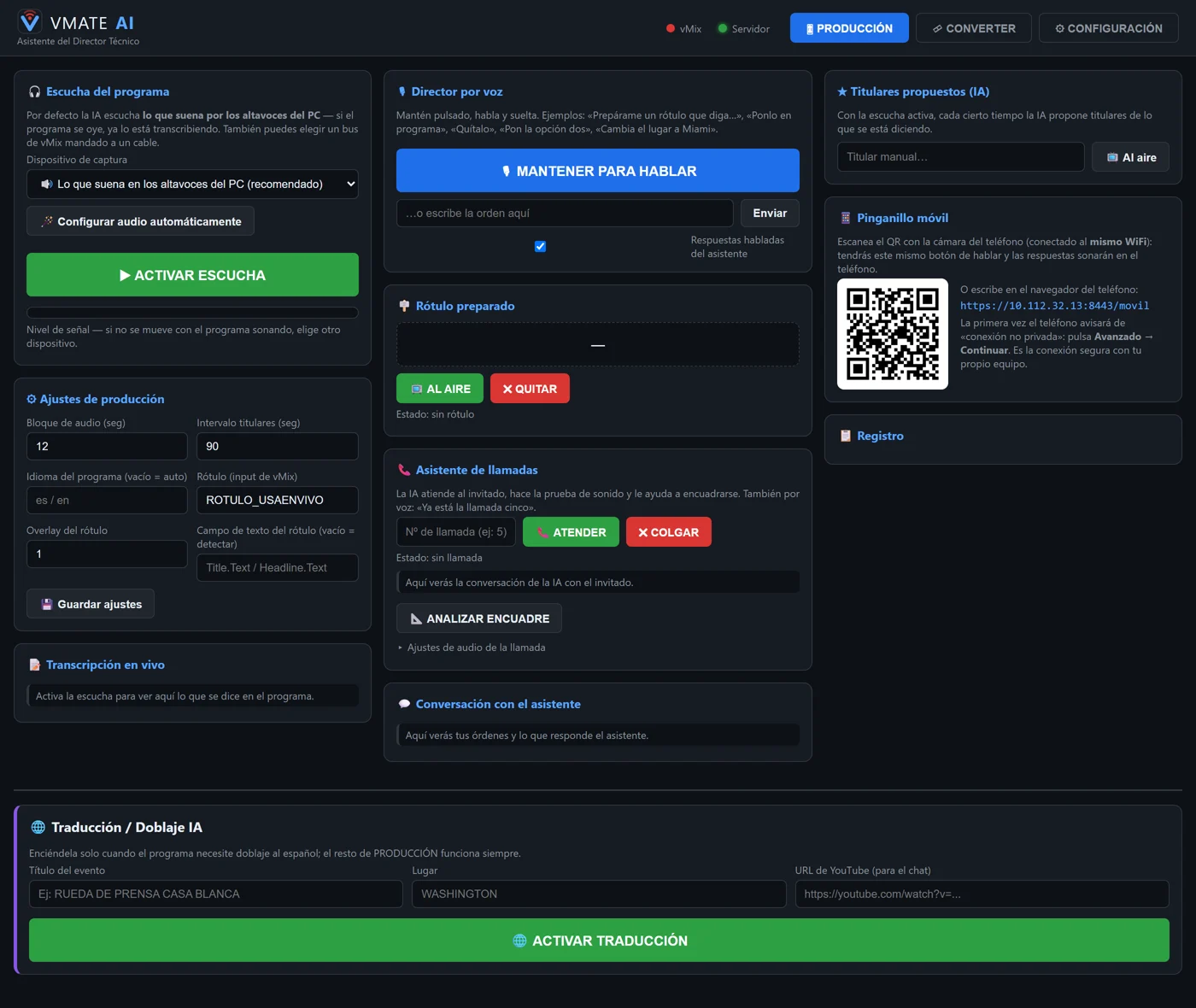
VMate AI production panel: voice directing, lower thirds, call assistant and AI headlines

The production panel: voice directing, lower thirds, call assistant, AI headlines and phone talkback, all on one screen.

Live production

What it does while you are on air

Tested on air every single day on our own USA en Vivo channel before it reaches your studio.

Listens and suggests your headlines

It transcribes what is going out in real time and suggests lower thirds ready to put on air with one click. No cabling needed: it captures whatever comes out of the computer's own speakers.

Voice director

Hold a button down and speak normally: "prepare a lower third that says…", "put it on programme", "cut to camera two", "mute the music", "start recording". Sensitive actions ask you to confirm out loud before they run.

Your phone as talkback

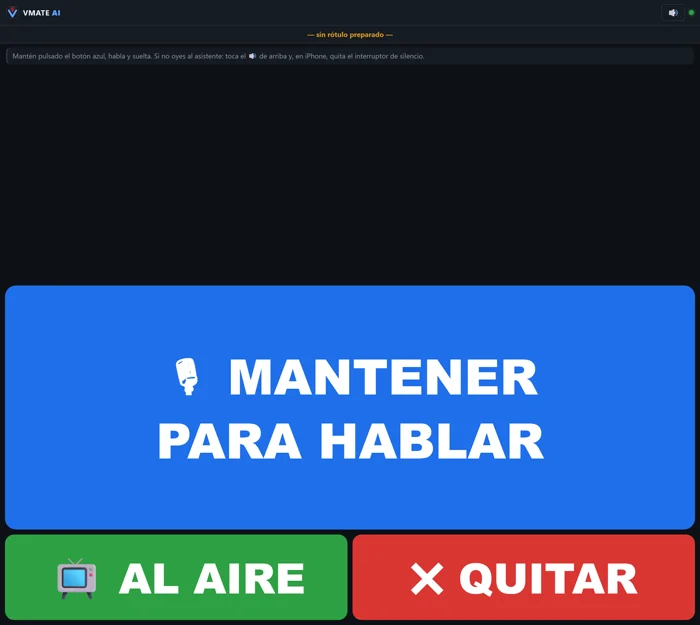
Scan a QR code and your phone becomes the director's remote: hold, speak, and the AI runs the command in vMix. Without leaving the control room and without cables.

Translation and dubbing

Recorded clips are transcribed, dubbed into another language with AI voices and put back into the vMix playlist in the exact order they were recorded. With translated tweets on screen and YouTube chat read out.

Debate desk with AI presenters

Two artificial intelligence presenters comment on the event during breaks, so the live show never falls silent while the next block is being prepared.

Show wrap-up

When you finish it generates the highlights, a voiced recap and archives the full show alongside its transcript. Nobody has to stay behind to do it by hand.

The standout feature

The AI handles your guests on its own

When a guest joins a vMix video call, VMate greets them without you having to do anything: it introduces itself as an artificial intelligence production assistant, runs the sound check measuring their actual level, checks their framing with computer vision — asking them to turn the phone if they are in portrait, or to centre themselves — and tells you when they are ready to go on air. It sorts out all the audio routing inside vMix by itself.

It is the difference between someone minding a guest for half an hour and spending that half hour directing the show.

And it does it in Spanish, English or Brazilian Portuguese: the language you choose changes the whole application, not just the menus — the voice commands, the lower thirds and what the assistant says to your guest.

VMate AI mobile view with the large hold-to-talk button

From your phone: hold, speak, and the command runs in vMix.

Converter

And the everyday editing tools

The least glamorous part and the one that saves the most time: what used to be minutes of exporting is now seconds.

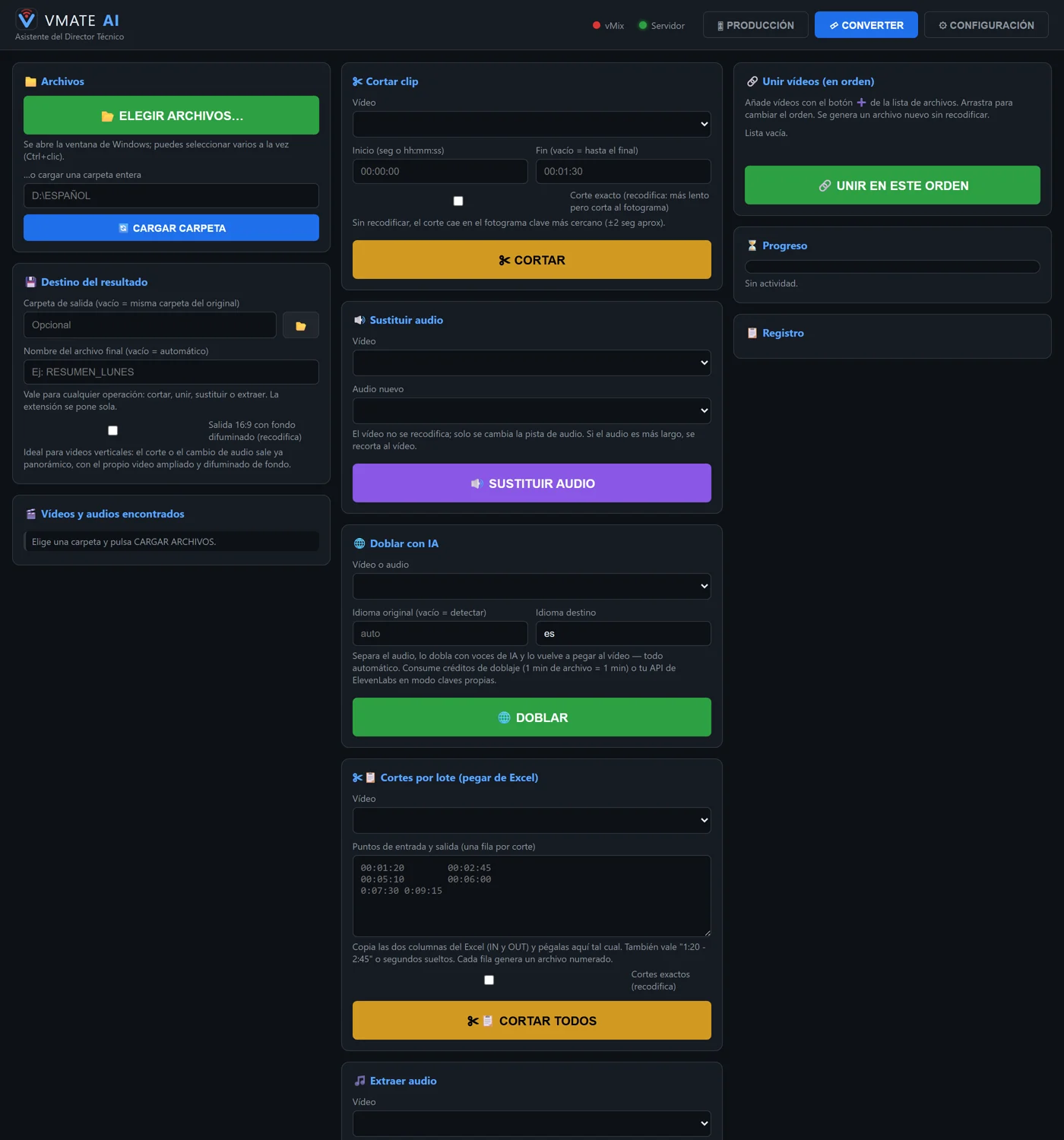
VMate AI Converter tab with the cutting, dubbing and transcription tools

The Converter tab: cut, join, dub with AI, batch cuts and transcribe.

  • Cut, join, replace or extract audio without re-encoding: seconds, not minutes.
  • Batch cuts: paste the in and out columns from Excel and it produces every numbered cut in one go.
  • Vertical to 16:9 with the video itself blurred as the background.
  • Transcribe any video or audio and download the text (.txt) and the subtitles (.srt).
  • Dub a file into another language, automatic from start to finish.
Who it is for

Built for small teams with big ambitions

  • Spanish-language news channels covering English-language content.
  • One-person production companies and professional streamers working with vMix.
  • Local TV and IPTV channels with minimal crews.
  • Churches, local sports and municipalities that broadcast live.

Requirements

  • 64-bit Windows 10/11
  • vMix, on the same PC or on the local network
  • An internet connection
  • A single executable: no Python, no FFmpeg, nothing else to install
  • Interface, assistant and manual in Spanish, English and Brazilian Portuguese
Being straight with you

What you should know before you start

We would rather tell you here than after you have paid.

It is for vMix

It is not a plugin: it is a separate application that talks to vMix. It does not work with OBS or other switchers.

It needs internet

The artificial intelligence features run in the cloud. It tolerates brief dropouts, but without a connection they do not work.

Dubbing is neither instant nor part of the subscription

Each clip takes a little while to process and uses up hours from the dubbing pack, which is bought separately.

The call assistant needs a virtual cable

To hear your guests it needs the VB-Audio Hi-Fi Cable, which is free. The application gives you the link and sets up almost everything by itself. No other feature needs it.

Download and pricing

Start with 30 days free

Every feature, with no limits, for a whole month. No credit card asked: you install it, register with your name and email, and it is running.

Download VMate AI 4.0.5

64-bit Windows 10/11 · 67.1 MB · 5 August 2026

  • Requirements: 64-bit Windows 10/11, vMix installed and an internet connection.
  • Installation: a single executable, no technical knowledge needed.
  • Trial: 30 full days. It only asks for your name and email the first time you open it.
Windows will show a blue warning when you open it — that is normal

The installer is not digitally signed yet, so Windows shows the "Windows protected your PC" screen. It does not mean there is anything wrong with the file: it is what Windows does with any new program that has not built up a reputation yet. To continue, click More info and then Run anyway.

SHA-256 fingerprintdc3f8ec17430aa82431184782ca5dda456f9bb648b17e75109bdb93fb2bdee4c

When the trial ends

Pricing

One subscription that includes everything, and dubbing separately in prepaid packs of hours, because that is what genuinely costs money to run.

Everything included

VMate AI subscription

$39per month

The complete assistant, with no limit on shows or hours on air.

  • Live show listening with suggested lower thirds
  • Voice director from the PC or your phone
  • Call assistant that handles guests on its own
  • Transcriptions, subtitles and the Converter tools
  • Full application in Spanish, English and Brazilian Portuguese
  • Updates and new versions included

Pay with your VMate account email so it activates by itself.

Subscribe for $39/month

Renews monthly and you can cancel whenever you want. The final total is calculated at checkout.

Bought separately

Dubbing pack

$1803 hours of dubbing

Dubbing and content translation are paid by the hour, because it is the most expensive process to run. It is not part of the subscription.

  • $60 per hour of dubbed material
  • Minimum 3 hours per pack
  • Hours do not expire while the account is active
  • At checkout you can take 2 packs (6 h), 3 (9 h) and so on

Pay with your VMate account email so it activates by itself.

Buy 3 hours for $180

One-off payment, non-refundable. The final total is calculated at checkout.

Pay with the same email you registered with in VMate AI

Your licence and hours activate automatically as soon as the payment goes through, but the system matches the purchase to your account by email address. If you pay with a different address from the one you used to register in the app, type it into the "Email you registered with in VMate AI" field on the payment form. If you have already paid and nothing arrived, write to us and we will sort it out straight away.

Resources

Tutorials, news and versions

This will be VMate's support hub: video tutorials, product news and the version history will be published here.

Video tutorials are coming here very soon.

Product news will be published here.

Versions

Current version: 4.0.5.

  • 4.0.5 agosto 2026
    The assistant no longer nags about framing: it asks once, offers to leave it as it is in the same sentence, and if the guest says they cannot or would rather not — in Spanish, English or Portuguese — it accepts their shot and moves on. If the call comes in vertical, it flags it to the director.
  • 4.0.4 agosto 2026
    Fixed a bug that stopped show listening and call video checks from working on machines without a D: drive. And the Converter can now join videos of different quality or format.
  • 4.0.3 agosto 2026
    Brazilian Portuguese across the whole application: panel, voice commands, lower thirds and the assistant that handles guests. Three languages now, each with its own manual.
  • 4.0.2 agosto 2026
    Clean startup on freshly installed machines: the warnings that filled the console window on launch are gone, and the sound selector shows the speaker name again.
  • 4.0.1 agosto 2026
    Manual in English too, cheaper transcription, an in-app suggestions box and an automatic notice when a new version is out.
  • 4.0 julio 2026
    Live translation and dubbing, voice directing, call assistant with computer vision, phone as talkback and the Converter tab.
Frequently asked

What we get asked most

Does VMate AI work with OBS, or only with vMix?

Only with vMix. VMate is not a plugin: it is a separate application that talks to vMix, installed on the same PC or on the local network. It does not work with OBS or other switchers.

Can I try it before paying?

Yes. There is a 30-day trial with every feature and no credit card: you install it, register with your name and email, and it is running.

What does the $39 a month subscription include?

Everything except dubbing: live show listening with suggested lower thirds, the voice director from the PC or your phone, the assistant that handles video-call guests on its own, transcriptions, the Converter tools and all new versions. Dubbing and content translation are bought separately, in prepaid packs of $180 for 3 hours, because it is by far the most expensive process to run.

Does it need an internet connection?

Yes. The AI features run in the cloud. It tolerates brief dropouts, but without a connection they do not work.

What languages does it work in?

Spanish, English and Brazilian Portuguese. You pick the language when you install it and it changes the whole application: the panel, the voice commands, the lower thirds and what the assistant says to your guests. The manual comes in all three.

Do I need to install anything else on the computer?

No. It is a single executable with everything bundled: no Python, no FFmpeg, nothing else. The only exception is the call assistant, which needs the free VB-Audio Hi-Fi Cable virtual audio driver in order to hear your guests. The app gives you the link and sets up almost everything by itself.

What do I need to do so my licence activates after paying?

Pay with the same email address you registered with in VMate AI, or type it into the "Email you registered with in VMate AI" field on the payment form. With that, your licence and hours activate automatically as soon as the payment goes through. If you have already paid and nothing arrived, write to us and we will sort it out straight away.

Let the AI direct alongside you

Download it, try it for a whole month without paying anything, and decide afterwards.

Download and try it free I have a question